Table of Contents
Download the Extension #
To get started with Send Blaster Pro, download the official extension for your preferred browser:
- Google Chrome: Visit the Chrome Web Store and click “Add to Chrome”.
- Mozilla Firefox: Go to the Firefox Add-ons page and click “Add to Firefox”.
- Microsoft Edge: Navigate to the Edge Add-ons store and click “Get”.
Alternatively, you can visit the Downloads page on our website to find direct links for each browser.
Account Setup #
After installing the extension:
- Open the Extension: Click on the Send Blaster Pro icon in your browser’s toolbar.
- Sign In: Use your email address or Google account to create or log into your Send Blaster Pro account.
This account will allow you to access your contact lists, message templates, and sending history across devices.
Quick Tips for Efficient Use #
- Stay Updated: Ensure your extension is up to date to benefit from the latest features and improvements.
- Manage Contacts: Regularly update your contact lists and message templates for streamlined communication.
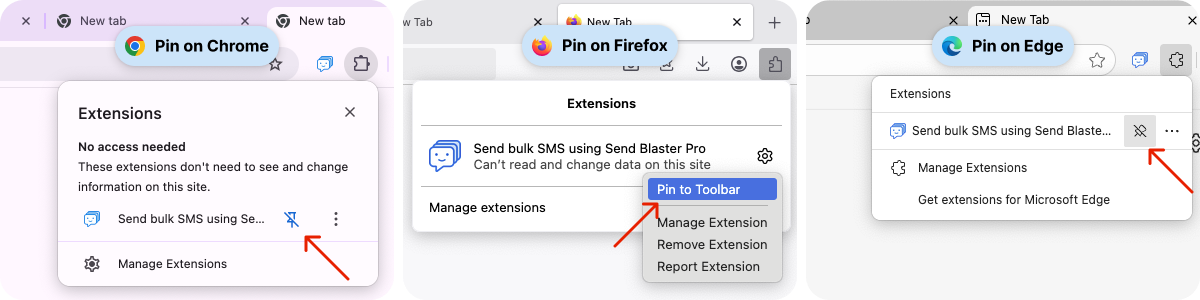
- Pin the Extension: For quick access, pin Send Blaster Pro to your browser’s toolbar by right-clicking the extension icon and selecting “Pin”.